
CARRERA DIGITAL HARDWARE
Carrera Pit Lane and Pit Stop Adapter Unit (PSAU): refuelling and Track Engine
This is how the Carrera DIGITAL Pit Lane works: Pit Lane, PSAU, infrared receiver, refueling and lap counting, Pace Car with second Pit Lane – and how Track Engine recognizes it.
Carrera DIGITAL 124/132 Pit Lane (20030356) and Pit Stop Adapter Unit (20030361) · ~12 min read · Updated: 13 October 2026
In Carrera DIGITAL, a Pit Lane does more than provide a branch: it enables refuelling and can count laps.
This article explains its construction step by step and what Track Engine does with it. Plan a Pit Lane in Track Planner before building the layout.
Compatibility
- Carrera DIGITAL 132
- Yes – the Carrera manual applies together to DIGITAL 124/132.
- Carrera DIGITAL 124
- Yes – the Carrera manual applies together to DIGITAL 124/132.
- Carrera Evolution
- No. Carrera Evolution is a separate analog system. Carrera explicitly warns against using DIGITAL 124/132 components on an Evolution track. Track Engine currently supports only track planning for Evolution.
What are Pit Lane and PSAU?
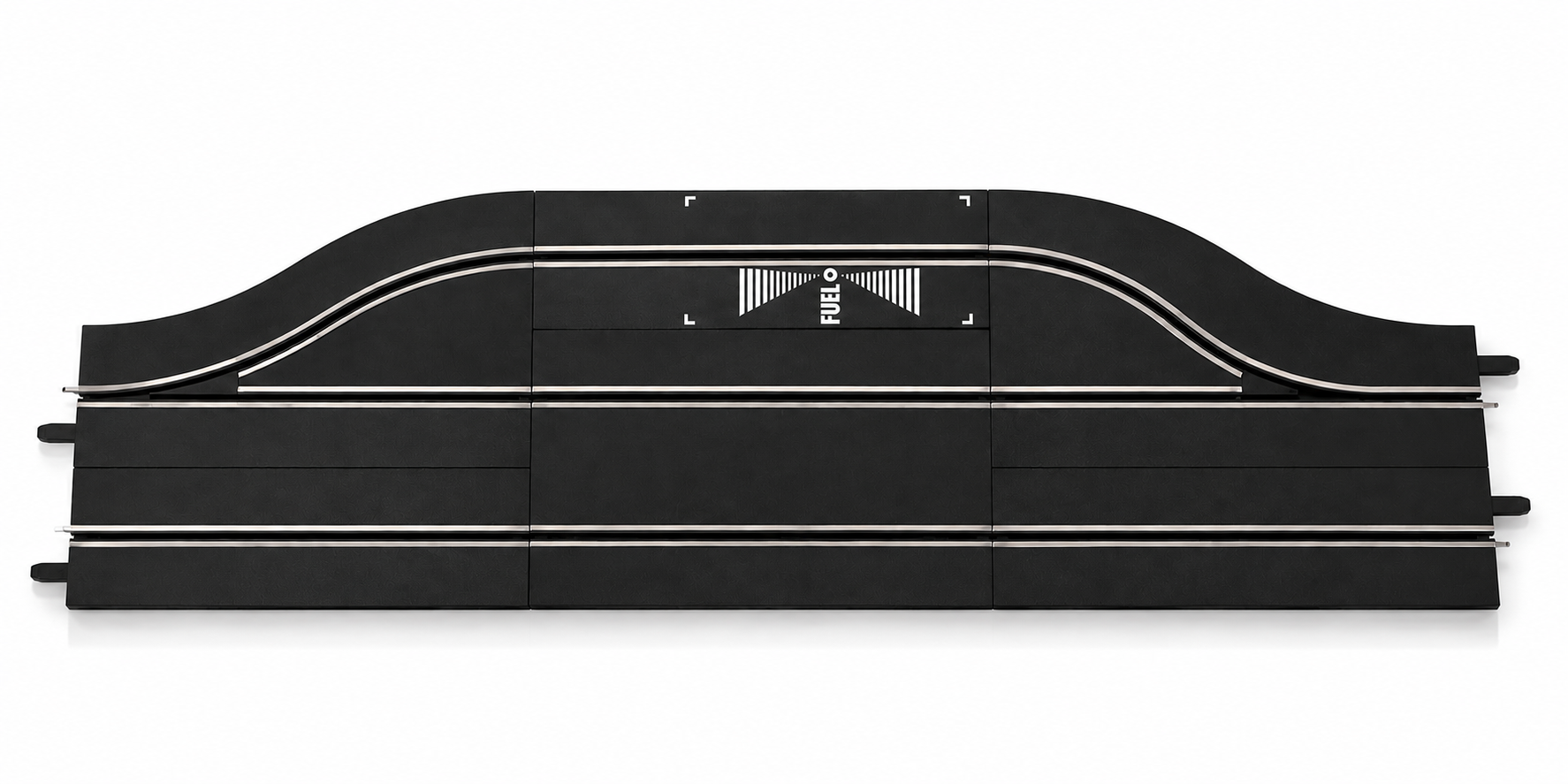
Cars refuel in the Pit Lane, which can also count laps. Pit Lane lap counting can be switched off. Fuel level is shown only when a Driver Display (20030353) is connected.
The Pit Stop Adapter Unit (PSAU, 20030361) is the component between the input and output switches. An existing Pit Stop Lane 20030346 is retrofitted with the PSAU. The full range of functions is only guaranteed in conjunction with the Control Unit.
What can the Pit Lane do?
- Refuelling: cars enter the pit lane and refuel at the fuel sensor.
- lap counting in Pit Lane (turn on and off at the Control Unit).
- Pace Car function: In conjunction with a second Pit Lane (see below).
- Fuel indicator on the Driver Display (only with Driver Display).
Pit Lane 20030356 includes: 1 standard straight, 1 Pit Stop Adapter Unit, 2 single-lane track sections, 1 Pit Lane entry switch, 1 Pit Lane exit switch and 16 track section locking clips. The PSAU sold separately includes 1 Pit Stop Adapter Unit and 2 track section locking clips.
How to build the Pit Lane
The components, starting from the connection track section with the Control Unit:
- 1 Connection track section + Control Unit
- Older sets use a connection track section with a Black Box.
- 2 Pit Stop Lane entry switch
- Here the Pit Lane branches off the track
- 3 Pit Stop Adapter Unit
- with the words “FUEL”
- 4 Pit Stop Lane exit switch
- Here the cars return to the track
- 5 Infrared receiver
- dark diode, sitting on the input switch
Building Pit Lane
- Install the input switch and the output switch of the Pit Lane.
- Put the Pit Stop Adapter Unit in between. The lettering ‘FUEL’ shall be legible in the direction of travel.
- Make sure that the infrared receiver (dark diode) lies on the switch, which acts as an entry switch section.
- Install a standard straight between the entry and exit switches.
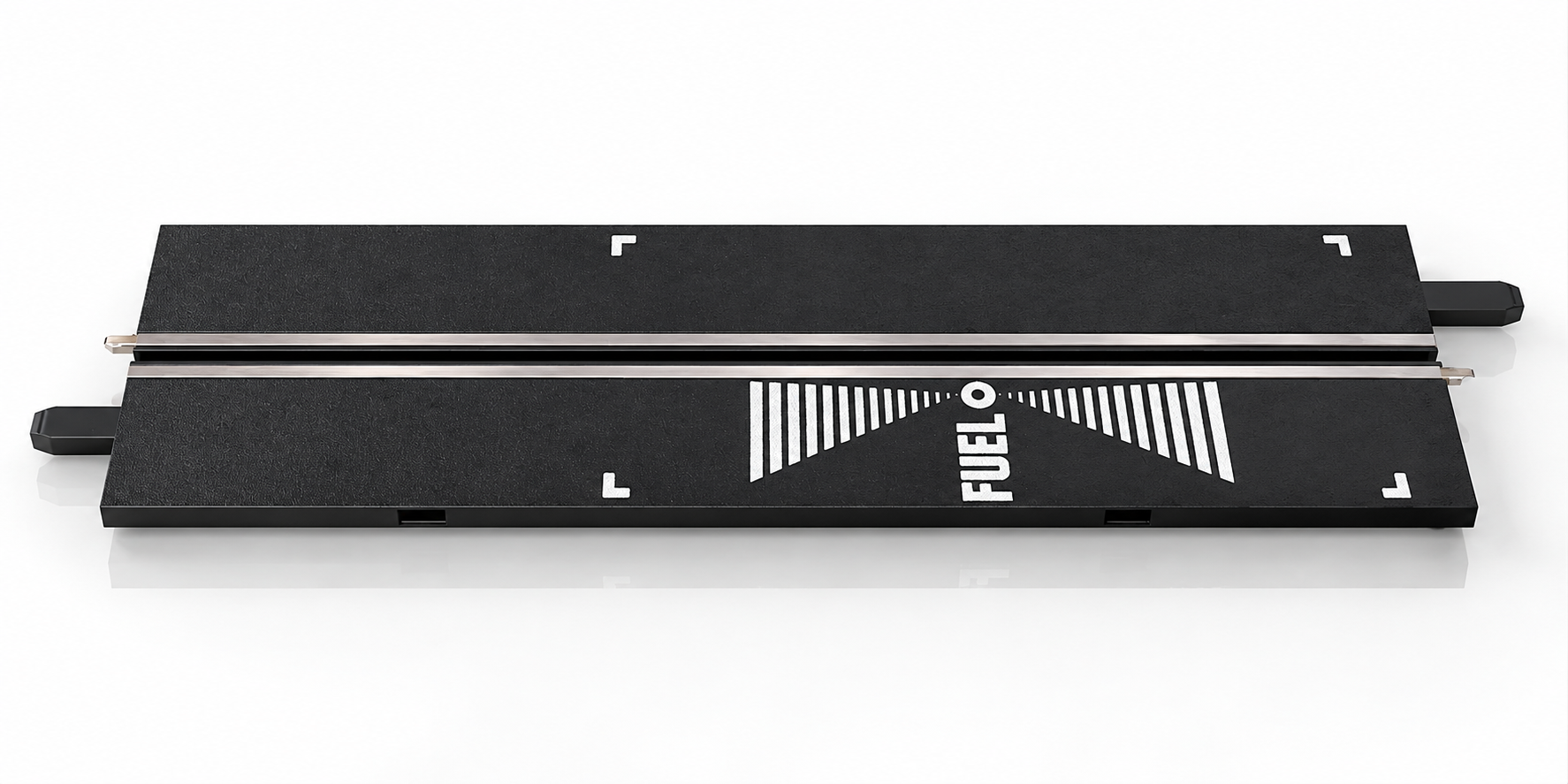
Photo to follow: Infrared receiver on the input switch. An authentic image will be added.
Pace Car: two Pit Lanes
To use Pace Car and refuelling at the same time, you need two Pit Lanes: one for refuelling and one for the Pace Car. Do not install one Pit Lane inside another; the switch for the second Pit Lane would no longer be triggered.
How you program and start the Pace Car is on the Control Unit page.
First commissioning: refuelling
Refueling for the first time
- Set the slider of the tank function on the Control Unit to ON or REAL. At OFF, the vehicles do not consume “petrol”.
- Set the desired tank contents at the CU (FUEL button).
- Drive in Pit Lane via the tank sensor. The bar display of the Driver Display begins to blink.
- Press the lane-change button of your hand controller to refuel.
- End the refueling process by releasing the lane-change button and move on.
Reading the fuel level
On Driver Display, the bar shows the current fuel level and the five yellow LEDs show the number of refuelling operations.
Interaction with other Carrera components
- Control Unit: sets the tank function, tank contents and lap counting of the Pit Lane.
- Driver Display: shows tank level and number of refueling operations.
- Position Tower: Vehicles with an empty tank are not included in the lap count.
- Adapter Unit: integrates Driver Display, Position Tower and Startlight into the track.
Using it with Track Engine
This section explains what the hardware enables in Track Engine and which tasks remain on Carrera hardware.
Using Pit Lane with Track Engine
Track Engine cannot confirm a PSAU from the layout alone. Plan the Pit Lane in Track Planner, connect the Control Unit and run the track test on the physical track.
Let Track Engine detect the PSAU
- Plan Pit Lane and PSAU in the Track Planner and save the layout.
- In Race Control, select ‘Connect Control Unit’ and wait for ‘CU ready’.
- Start the track test. Track Engine highlights the point you should drive over so it can detect the PSAU.
- Check if the PSAU is detected and refueling is available.
Screenshot to follow: Track test: PSAU detected, refuelling available. An authentic image will be added.
- Refuelling
- Control Unit + PSAU
- Pit rules
- Control Unit + PSAU (mandatory stops, minimum stationary time, refuelling requirement and pit window)
- Pace Car
- Control Unit + second Pit Lane (pace-car lane)
- Weather rules
- with CU and PSAU fully available
Track Engine also checks that Pit Lane is accessible from any lane. To publish a layout with PSAU in the community (DIGITAL 132/124), the PSAU must be accessible from all physical lanes.
What Track Engine makes of it – and what remains at Carrera
- Race Control reads fuel mode from the connected CU and shows fuel level and pit status.
- You still perform the refuelling operation on Carrera hardware, using the fuel sensor and the controller's lane-change button.
- A Carrera refueling process does not automatically meet the rules for a valid mandatory pit stop in Track Engine. Note the pit rules set for your race.
- Driving through the pit is not yet a fuel stop: the car must reach the appropriate PSAU/pit state.
Read more
The Track Engine articles “Refueling and PSAU”, “Pit Lane in Track Planner” and “Additional Functions” under “Advanced Articles” deepen these points.
Common problems
I'm in the pit, but the car doesn't fill up.
- Cause:
- The tank function is OFF, the car was not driven via the tank sensor or the car and hand controllers are not correct.
- Solution:
- Set the tank function at the CU to ON or REAL, drive via the tank sensor and hold the lane-change button of the associated hand controller during refueling.
Pit Lane does not count laps.
- Cause:
- The lap count in Pit Lane is switched off.
- Solution:
- Turn it on at the CU: hold down CU SPEED when the CU is switched off, turn CU on, release SPEED and select two LEDs with SPEED. The setting is adopted as soon as a vehicle drives via the Pit Lane sensor.
The fuel level is not displayed.
- Cause:
- The display of filling level and refuelling processes is only possible with the Driver Display. Without a tank function, the display shows the speed.
- Solution:
- Connect a Driver Display and turn on the tank function at the CU.
The tank sensor does not react.
- Cause:
- The infrared receiver sits on the wrong switch or the Pit Stop Adapter Unit is not installed as described in the instructions.
- Solution:
- Check that the infrared receiver (dark diode) is on the input switch and that the lettering ‘FUEL’ is readable in the direction of travel.
The Pace Car cannot be used at the same time as the Pit Lane.
- Cause:
- Both functions require two Pit Lanes.
- Solution:
- Build a second Pit Lane separately; do not install one Pit Lane within another.
Track Engine does not recognize the PSAU.
- Cause:
- The track test was not carried out with the real track, the PSAU was not crossed over the marked point or the layout does not match the construction.
- Solution:
- Compare the planned layout with the physical track, connect the CU and repeat the track test. A planned PSAU is not yet a detected PSAU.
Frequently asked questions
What is the difference between Pit Lane and PSAU?
The Pit Lane is the full pit section with entry and exit switches. The Pit Stop Adapter Unit (PSAU) is the track section between them. It is included with Pit Lane 20030356; an older Pit Stop Lane can be upgraded with a PSAU.
Do I need a Driver Display for refueling?
Not for refueling, but for indicating tank level and refueling processes.
What is the infrared receiver for?
It sits as a dark diode on the input switch and belongs on the switch, which acts as an entry switch section.
How many Pit Lanes do I need for Pace Car and refueling?
Two. One for the Pit Lane, one for the Pace Car.
What does Track Engine need to refuel?
A Control Unit and a physically detected PSAU in a matching Pit Lane.
Can Pit Lane be used in Evolution?
No. Pit Lane is part of Carrera DIGITAL 124/132. Carrera prohibits using DIGITAL components in an Carrera Evolution track.
Related articles
Continue with Track Engine
Track Engine connects Carrera DIGITAL 132/124 to live timing, Race Control, strategy and analysis.
Sources
Carrera hardware details are based on Carrera's German instruction manuals:
- Carrera DIGITAL 124/132 Pit Lane 20030356 – Assembly and operating instructions
- Carrera DIGITAL 124/132 Pit Stop Adapter Unit 20030361 – Assembly and operating instructions
- Carrera DIGITAL 124/132 Control Unit 20030352 – Assembly and operating instructions
- Carrera DIGITAL 124/132 Driver Display 20030353 – Assembly and operating instructions
Track Engine is an independent third-party product and is not affiliated with, authorized, sponsored or endorsed by Carrera.
Carrera and the product names mentioned are trademarks or product names of their respective owners. They are used here only to describe the products.
Was this article helpful?