
Race Control
Race Control Advanced Features
Configure additional race functions such as DRS, Pit Rules, Weather, and Tires.
Advanced features at a glance
Race Control offers several advanced features: DRS, Pit Rules, Weather, and Tires. This article is an overview — the deeper treatment of fueling/PSAU lives in its own "Fueling and PSAU" article.
- Open the advanced features area in Race Control.
- Check which features are available for your track.
- Keep in mind the difference between static track capability and session configuration (see below).
Static track capability vs. race/session rule
Two distinct concepts matter here, and shouldn't be conflated:
- Static track capability — what a track's actually installed or planned hardware fundamentally makes possible.
- Race/session rule — how a feature behaves during an actual session or race.
The table below shows the static capability requirements:
| Feature | Requirement |
|---|---|
| DRS | Control Unit + 2 Check Lanes |
| Fuel Consumption | Control Unit |
| Fueling | Control Unit + PSAU |
| Pit Rules | Control Unit + PSAU |
| Pace Car | Control Unit + second Pit Lane/Pace-Car Lane |
| Weather Rules | No Control Unit → unavailable · Control Unit only → partially available · Control Unit + PSAU → fully available |
DRS
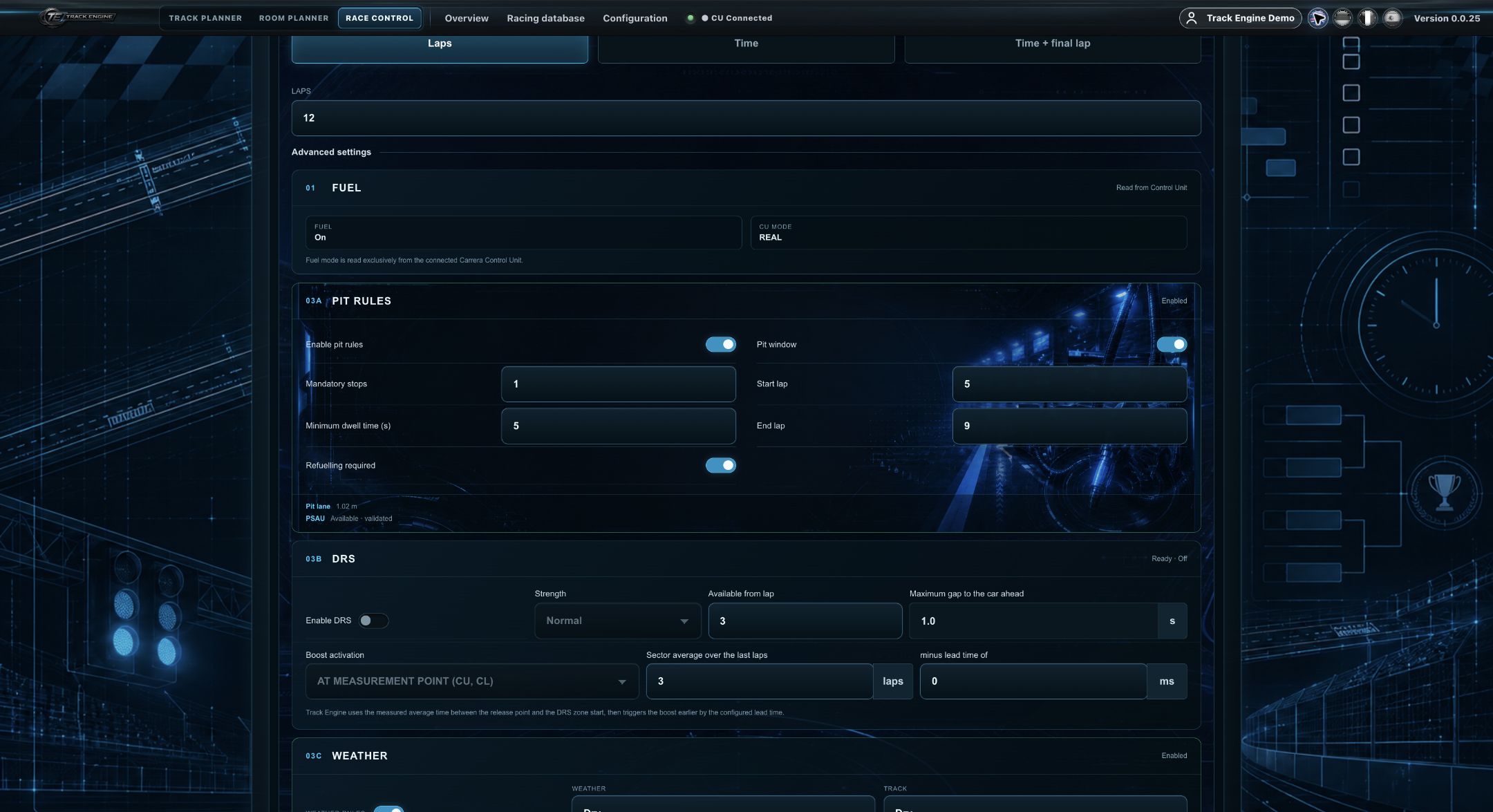
DRS is a static track capability that requires a Control Unit and 2 Check Lanes. In the race mode step, you can configure:
- the strength (Mild, Normal, Strong — defined in Configuration)
- the lap from which DRS may be used
- the maximum time gap to the car ahead (e.g. 1 second) at which DRS activates for the following car
- whether activation is evaluated live at the measurement point (CU or Check Lane), or from a previously-determined average time over several laps minus a lead-in
Pit Rules
Pit Rules — like Fueling — require a Control Unit and a PSAU. Configurable:
- the number of mandatory stops
- the minimum stop duration
- whether fueling is required during the stop
- the lap window (first lap from which stops count, last lap up to which stops count)
Weather
Weather Rules are staged: unavailable without a Control Unit, partially available with a Control Unit alone, fully available with a Control Unit and PSAU. At race start you set the starting weather and track condition, in two modes:
- Automatic — the app pulls the real-world weather for the detected location in real time.
- Manual — the Race Director has full control and can adjust conditions dynamically at any time.
Tires
Tires are one of the vehicle properties in the Racing Database; the starting tire type is set per vehicle in vehicle settings. In Configuration under "Weather & Tires" you define which tire types get a braking-performance penalty under which weather conditions. During the race, you can pre-select a tire change matching current conditions via the Driver Display at any pit stop — it's executed automatically at the next stop. Tires additionally wear/degrade over the distance driven.
Image coming soon
Pace Car
The Pace Car feature requires a Control Unit plus a second Pit Lane or Pace-Car Lane. The Race Director triggers it via the "Pace Car"/"Safety Car" button, which starts a yellow-flag phase together with the physical Pace Car on track.
Capability states: available, partially available, unavailable
The relevant capability model has three states: available, partially available, and unavailable. "Partially available" must not be conflated with "unavailable."
Static capability vs. configurable session rule
The table above describes what a track can fundamentally do based on its hardware (static capability). The settings described in this article (DRS strength/activation logic, Pit Rule parameters, weather mode, tire braking penalties, Pace Car triggering) are the separate, per-race configurable session rule.
Technical boundary
Internal calculation details (e.g. the exact tire-wear algorithm or exact compound physics) are intentionally not part of this knowledge base.
Related articles
Was this page helpful?