
CARRERA DIGITAL HARDWARE
Carrera Startlight: connection, start sequence and false starts
The Carrera Startlight shows the traffic light phase at the start of the race. So you connect it via the Adapter Unit, start the sequence at the Control Unit and what happens in the event of a false start.
Carrera DIGITAL 124/132 Startlight (20030354) · ~7 min read · Updated: 13 October 2026
The Startlight displays the race-start sequence. The Control Unit determines when the race is released.
This article explains the connection and sequence, and how the Startlight appears in Track Planner.
Compatibility
- Carrera DIGITAL 132
- Yes – the Carrera manual applies together to DIGITAL 124/132.
- Carrera DIGITAL 124
- Yes – the Carrera manual applies together to DIGITAL 124/132.
- Carrera Evolution
- No. Carrera Evolution is a separate analog system. Carrera explicitly warns against using DIGITAL 124/132 components on an Evolution track. Track Engine currently supports only track planning for Evolution.
What is the Startlight?
The Startlight shows the light sequence at the beginning of a race. Its 5 LED rows light up one after another and go out when the race is released. The Carrera lettering on top lights while the track is powered. The Startlight works only with the Control Unit.
The package contains 1 Startlight, 1 border-strip connector, 1 border-strip compensator, 4 end pieces and 12 track section locking clips, plus 1 Adapter Unit.
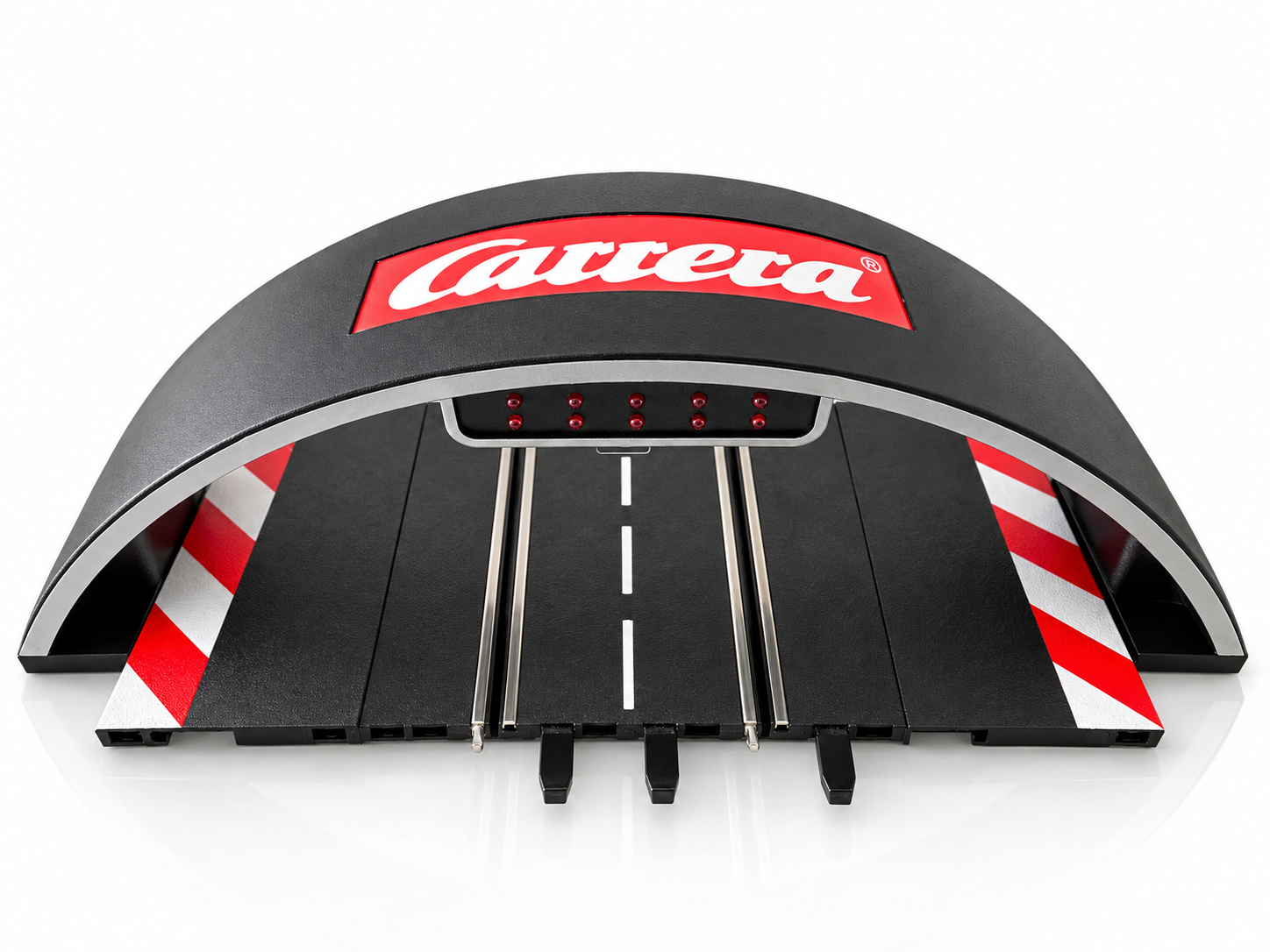
How to connect the Startlight
Connecting Startlight
- Install the supplied Adapter Unit at the desired point in the track.
- Plug in the Startlight at the appropriate location of the Adapter Unit.
When used with the Startlight, one connection on the front and one on the rear remain free on the Adapter Unit.
Photo to follow: Connected to the Adapter Unit. An authentic image will be added.
Start sequence and false starts
Start the race with starting lights
- Turn on the Control Unit. After about one second, the middle LED lights up permanently.
- Press the START button until all LEDs light up.
- Place the vehicles on the power track section.
- Press START again. The start sequence begins: the LEDs light and audible signals sound.
- When the LED sequence finishes, the Control Unit releases the race.
False start
If a driver moves a hand controller during the start-light sequence, this is a false start. That car briefly moves and its LED or the controller LED flashes. The race is not released and the start sequence must be repeated.
Without a start sequence, the track is released immediately when the CU is switched on; the Startlight does not signal a countdown in this case.
Working with other Carrera components
- Control Unit: It controls the Startlight. After 20 minutes of non-use, it turns off the Startlight in power-saving mode.
- Adapter Unit: integrates Startlight, Driver Display and Position Tower into the track.
- Lap Counter and Position Tower: show race time and positions after the start.
Using it with Track Engine
This section explains what the hardware enables in Track Engine and which tasks remain on Carrera hardware.
Startlight and Track Engine
- In Track Planner, place the Startlight and its border strips in the layout. Choose one of six installation variants (front or rear, on both sides, left only or without border strips).
- This selection only changes the placement in the layout. It does not set a countdown and a false start rule.
- Race Control shows the countdown with five red lights, also reflected on Track Engine's Driver Display. The Control Unit decides when the race is actually released; race timing starts only after that signal.
Screenshot to follow: Race Control: five red lights. An authentic image will be added.
Common problems
The starting lights do not light up.
- Cause:
- The Control Unit is in power-saving mode (20 minutes of non-use) or the Startlight is not sitting properly on the Adapter Unit.
- Solution:
- Turn the CU off and back on for 2–3 seconds and check the seat on the Adapter Unit. The Startlight only works with the Control Unit.
The race does not start.
- Cause:
- There was a false start.
- Solution:
- Restart the start sequence and move the hand controller only after the end of the traffic light phase.
There is no traffic light phase.
- Cause:
- The track was released without a start sequence: after switching on the CU, the centre LED lights and cars can drive immediately.
- Solution:
- After turning on, press START until all LEDs light up, put the vehicles on and press START again.
Frequently asked questions
How do I connect the Carrera starting lights?
Via the supplied Adapter Unit, which you can install anywhere in the track. The Startlight runs only with the Control Unit.
How do I start the traffic light sequence?
Turn on CU, press START until all LEDs light up, put vehicles on, press START again.
What is a false start?
A controller movement during the traffic light phase. The race is not released and must be restarted.
Is the starting light in Track Engine the same as the Startlight?
No. In Track Planner, you place the Startlight in your layout. The physical Startlight is controlled by the Control Unit.
Does the Startlight work with Evolution?
No. It belongs to Carrera DIGITAL 124/132. Evolution is a separate analog system.
Related articles
Continue with Track Engine
Track Engine connects Carrera DIGITAL 132/124 to live timing, Race Control, strategy and analysis.
Sources
Carrera hardware details are based on Carrera's German instruction manuals:
Track Engine is an independent third-party product and is not affiliated with, authorized, sponsored or endorsed by Carrera.
Carrera and the product names mentioned are trademarks or product names of their respective owners. They are used here only to describe the products.
Was this article helpful?