
CARRERA DIGITAL HARDWARE
Carrera Driver Display: readings, vehicle address and Track Engine
The Carrera Driver Display shows fuel level, fueling processes and racing position. Connection, set vehicle address 1–6 – and why it’s not Track Engine’s Driver Display.
Carrera DIGITAL 124/132 Driver Display (20030353) · ~8 min read · Updated: 13 October 2026
The Carrera Driver Display gives each driver information beside the track: fuel level, refuelling operations and current position.
Track Engine also has a ‘Driver Display’, but that is a browser page. This article explains both and keeps them distinct.
Compatibility
- Carrera DIGITAL 132
- Yes – the Carrera manual applies together to DIGITAL 124/132.
- Carrera DIGITAL 124
- Yes – the Carrera manual applies together to DIGITAL 124/132.
- Carrera Evolution
- No. Carrera Evolution is a separate analog system. Carrera explicitly warns against using DIGITAL 124/132 components on an Evolution track. Track Engine currently supports only track planning for Evolution.
What is the Carrera Driver Display?
The Driver Display shows a driver's fuel level, number of refuelling operations and current race position. A setting button assigns each display to a vehicle address from 1 to 6. It connects through the supplied Adapter Unit, a track section the length of a standard straight that can be placed anywhere in the layout.
The package contains 1 Driver Display, 1 Adapter Unit, 2 covers and 8 track section locking clips.
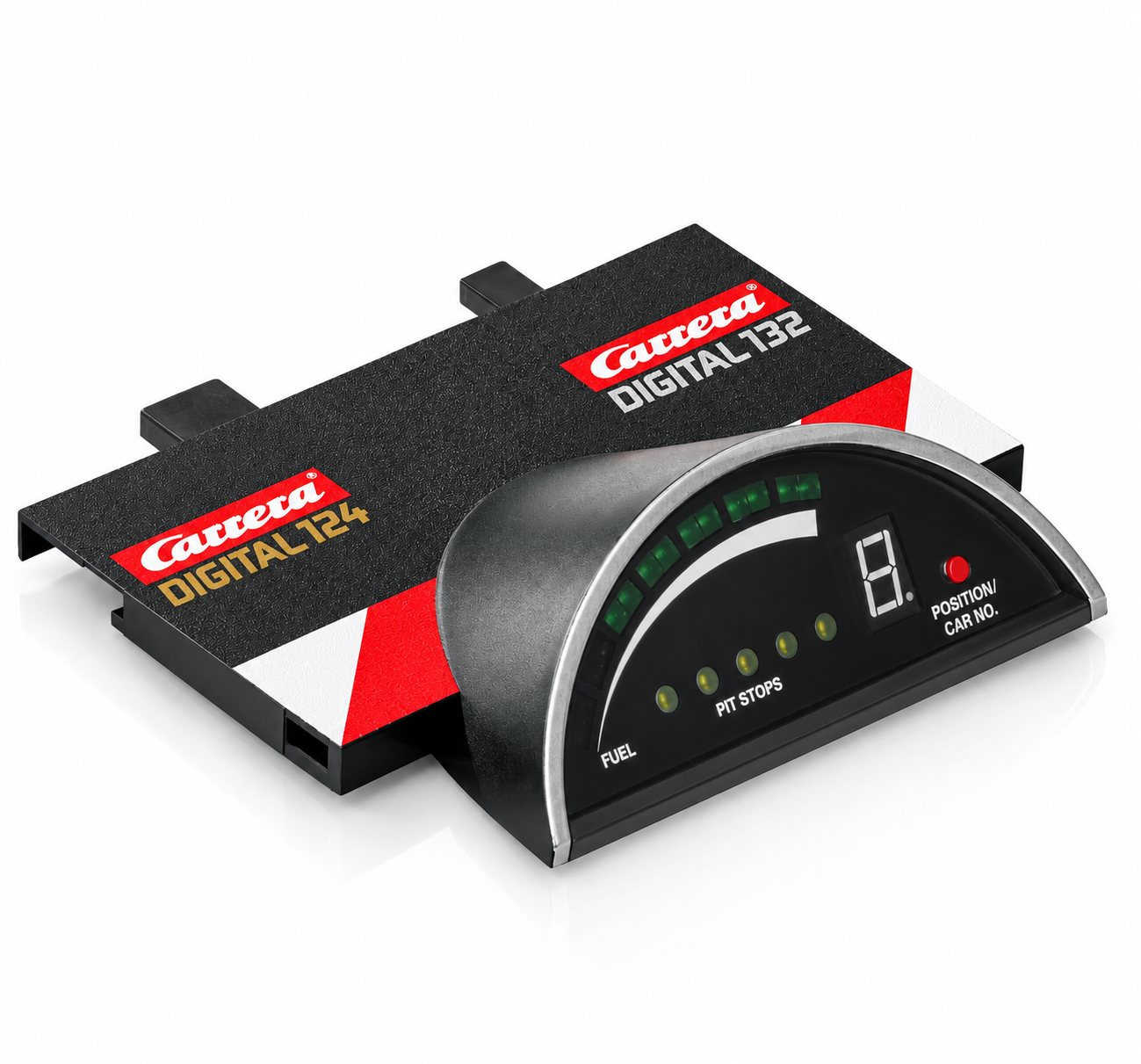
Display elements
- 1 LED bar display
- shows the tank level or the speed
- 2 Five yellow LEDs
- show a maximum of 10 refuelling processes (each LED counts 2)
- 3 Single-digit LED segment display
- Shows the vehicle address and the race position
- 4 Operating button
- selects the vehicle address
The bar display has two modes. With the Control Unit's fuel function OFF, or with Pit Stop Lane 20030346, it shows speed; the middle yellow LED lights. The bar follows the hand controller trigger. With the fuel function ON and a Pit Lane, it shows fuel level and refuelling operations.
Photo to follow: The display during the race. An authentic image will be added.
How to connect the Driver Display
Connect Driver Display
- Install the Adapter Unit at any point in the track.
- Plug in the Driver Display laterally at the appropriate position of the Adapter Unit.
First commissioning: Setting the vehicle address
Change the vehicle address
- Turn on the Control Unit. For about 3 seconds, the segment display shows the currently set vehicle address (with a point at the bottom right).
- Press the setting button until the desired address appears.
- After 3 seconds, the segment display returns to the race position.
Setting tank content
You program the tank contents at the Control Unit. How this works is in the instructions of the Control Unit.
Interaction with other Carrera components
- Control Unit: The full range of functions is only guaranteed with the Control Unit.
- Pit Lane and PSAU: Tank level and number of refueling operations appear only with Pit Lane 20030356 or Pit Stop Lane 20030346 plus Pit Stop Adapter Unit 20030361.
- Adapter Unit: integrates Driver Display, Position Tower and Startlight into the track.
- Pit Stop: When refueling, the bar indicator flashes; The yellow LEDs count the refueling processes.
Using it with Track Engine
This section explains what the hardware enables in Track Engine and which tasks remain on Carrera hardware.
The Carrera Driver Display and the Driver Display in Track Engine
Both are called the same, but are different things:
- Carrera Driver Display (20030353)
- a device with LED displays on the track, integrated via the Adapter Unit. Shows tank and position.
- Driver Display in Track Engine
- a browser page each driver opens through a QR code or link on a phone, tablet or other device. It is not a separate Carrera hardware accessory.
The Track Engine Driver Display shows position, lap, last and best lap times, gap and, depending on the track, sector times, fuel level, tyres and pit information.
Screenshot to follow: Driver Display in Track Engine (Browser). An authentic image will be added.
- The Carrera unit is not mentioned in the requirements of the Track Engine functions: refueling requires CU + PSAU, DRS CU + 2 Check Lanes, Pace Car CU + second Pit Lane.
- Whether Track Engine recognizes or uses the physical display is not described in the Help documentation. Therefore, consider both as independent.
- Track Engine's browser display does not replace a connected CU or the physical track test.
Common problems
The Driver Display remains dark.
- Cause:
- The Control Unit is switched to power-saving mode after 20 minutes of non-use or the display is not correctly connected to the Adapter Unit.
- Solution:
- Turn the CU off and back on for 2–3 seconds, check the seat of the display on the Adapter Unit.
The display shows the wrong vehicle address.
- Cause:
- The address is not set to the driver's hand controller.
- Solution:
- Turn on the CU and press the control button until the correct address (1–6) appears.
The tank level is not displayed.
- Cause:
- The fuel function at the CU is OFF, the Pit Lane (with PSAU) is missing or the display works as a speed indicator.
- Solution:
- Switch the tank function to ON/REAL and use Pit Lane 20030356 or Pit Stop Lane 20030346 with PSAU 20030361. The middle yellow LED signals the speed indicator.
The bar display flashes.
- Cause:
- The car is at the fuel sensor and ready to refuel.
- Solution:
- Press the lane-change button to refuel.
Frequently asked questions
Do I need the Carrera Driver Display?
You need it only if you want to see fuel level and refuelling operations on the physical track. It is not required just to drive.
How do I set the vehicle address?
Turn on CU, press the control button on the display until the desired address (1–6) appears.
Is the Driver Display in Track Engine the same device?
No. In Track Engine, the Driver Display is a browser page that each driver opens via QR code or link on their own device.
Does the display work with Evolution?
No. It belongs to Carrera DIGITAL 124/132. Evolution is a separate analog system.
Related articles
Continue with Track Engine
Track Engine connects Carrera DIGITAL 132/124 to live timing, Race Control, strategy and analysis.
Sources
Carrera hardware details are based on Carrera's German instruction manuals:
Track Engine is an independent third-party product and is not affiliated with, authorized, sponsored or endorsed by Carrera.
Carrera and the product names mentioned are trademarks or product names of their respective owners. They are used here only to describe the products.
Was this article helpful?