
CARRERA DIGITAL HARDWARE
Carrera Position Tower: positions, laps and connection
The Carrera Position Tower shows the racing positions of up to six vehicles and the laps of the leader. Display connection via the Adapter Unit, Autonomous and Pace Car.
Carrera DIGITAL 124/132 Position Tower (20030357) · ~7 min read · Updated: 13 October 2026
The Position Tower shows all drivers who is leading and how many laps the leader has completed.
This article covers Position Tower installation, readings and settings, plus its relationship to Track Engine.
Compatibility
- Carrera DIGITAL 132
- Yes – the Carrera manual applies together to DIGITAL 124/132.
- Carrera DIGITAL 124
- Yes – the Carrera manual applies together to DIGITAL 124/132.
- Carrera Evolution
- No. Carrera Evolution is a separate analog system. Carrera explicitly warns against using DIGITAL 124/132 components on an Evolution track. Track Engine currently supports only track planning for Evolution.
What is the Position Tower?
The Position Tower shows each vehicle's current race position and the leader's completed laps. Its two-digit segment display can represent up to 250 laps; dots at the lower right indicate hundreds. The package contains 1 Position Tower, 1 Adapter Unit and 4 track section locking clips.
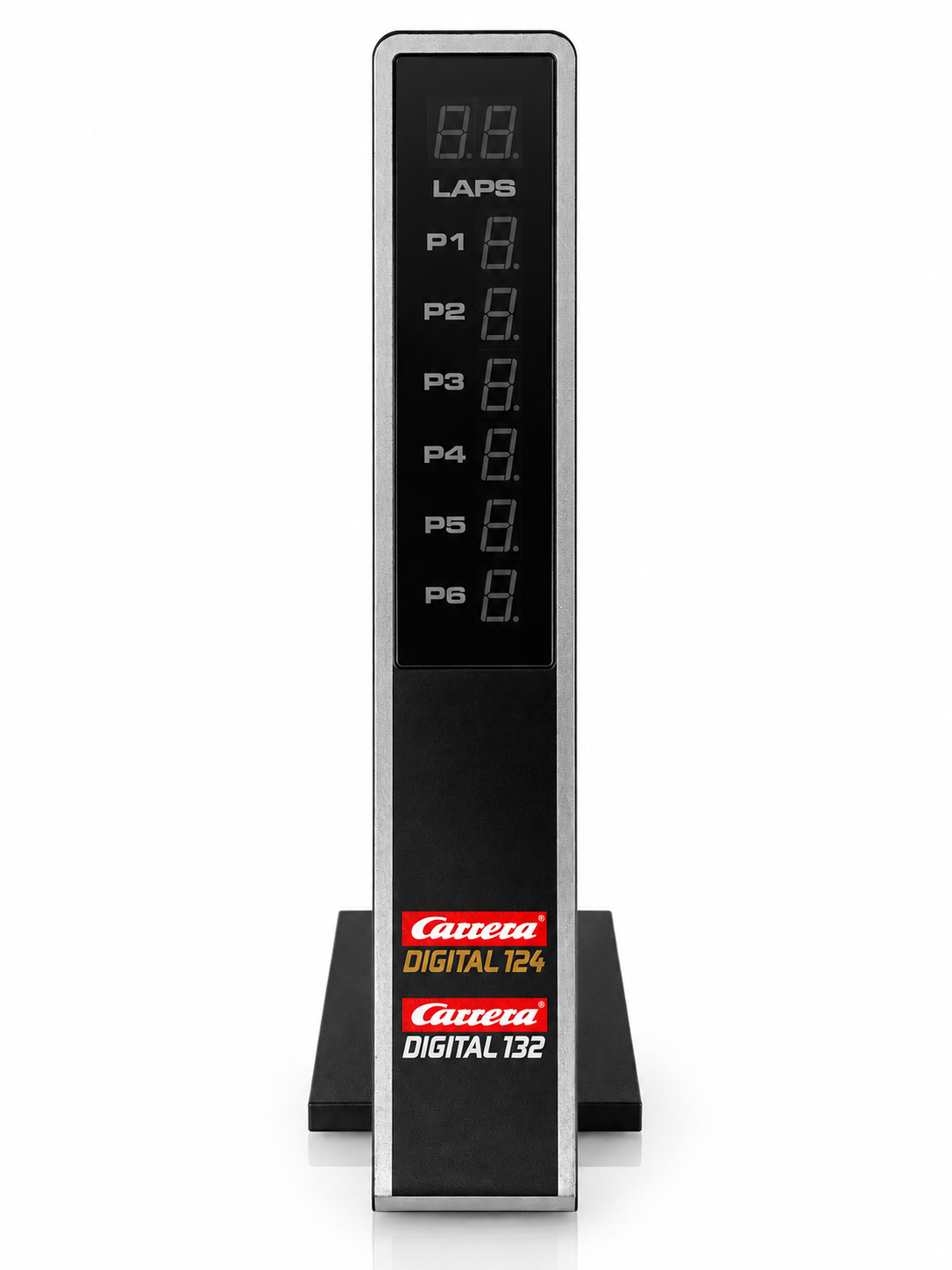
Display elements
- lap indicator
- two-digit LED segment indicator; point ‘a’ stands for 100 laps, point ‘b’ for 200 laps
- Position indicator
- a single-digit LED segment display showing the positions of up to 6 vehicles
The autonomous car is always displayed at the Position Tower with address 7, the Pace Car with address 8.
How to connect the Position Tower
Connect Position Tower
- Install the Adapter Unit anywhere on the track. It has the length of a standard straight.
- Plug in the Position Tower at the appropriate location of the Adapter Unit.
- Make sure that the track is operated with a Control Unit. The full range of functions is only guaranteed in this way.
Photo to follow: Connected to the Adapter Unit. An authentic image will be added.
Show Autonomous Car and Pace Car
Use the Control Unit to choose whether the Position Tower displays the Autonomous Car (address 7) and Pace Car (address 8).
Switch the display
- Turn off the Control Unit.
- Hold BRAKE while switching on the Control Unit, then release BRAKE.
- Press BRAKE again to change: one LED = no display, two LEDs = display on the Position Tower.
- Confirm the selection with START/ENTER.
Factory setting
After a reset of the Control Unit, the display of Autonomous Car and Pace Car is off again.
Interaction with other Carrera components
- Control Unit: lap counting and display work in conjunction with the CU.
- Lap Counter: when used together, the upper segment display shows the configured lap count and counts down to zero in a lap-based race. In a timed race it shows the remaining time.
- Pit Lane: Vehicles with an empty tank are not included in the lap count.
- Adapter Unit: integrates Position Tower, Driver Display and Startlight into the track.
If the configured race distance exceeds 250 laps, the upper segment display shows two check marks. It begins counting down once 250 laps remain.
Using it with Track Engine
This section explains what the hardware enables in Track Engine and which tasks remain on Carrera hardware.
Position Tower and Track Engine
- The Position Tower is not mentioned in the requirements of the Track Engine hardware functions: refueling requires CU + PSAU, DRS CU + 2 Check Lanes, Pace Car CU + second Pit Lane.
- Track Engine also shows laps, lap times and positions in Race Control. Its Help documentation does not describe a direct connection to the physical Position Tower.
Common problems
The display remains dark.
- Cause:
- The Control Unit went into power-saving mode after 20 minutes of non-use or the tower is not sitting properly on the Adapter Unit.
- Solution:
- Turn the CU off and back on for 2–3 seconds and check the tower’s seat on the Adapter Unit.
The Autonomous Car or Pace Car is missing in the display.
- Cause:
- The additional vehicle display is switched off at the CU by default.
- Solution:
- With the CU switched off, hold BRAKE while switching it on. Release BRAKE, select two LEDs with BRAKE and confirm with START/ENTER.
A vehicle is not counted.
- Cause:
- Vehicles with an empty tank are not included in the lap count.
- Solution:
- Refuel the vehicle in Pit Lane.
The lap display shows two check marks.
- Cause:
- The set number of laps is above 250.
- Solution:
- The display only counts down from 250 laps to be driven.
Frequently asked questions
How many vehicles does the Position Tower display?
Up to 6 hand-controlled vehicles. You can also enable the Autonomous Car (address 7) and Pace Car (address 8) at the Control Unit.
How many laps does it show?
A maximum of 250 laps. The hundreds are represented by points in the segments.
Do I need the Position Tower for Track Engine?
No. In the prerequisites of the Track Engine functions, it does not occur.
Does the Position Tower work with Evolution?
No. The Position Tower belongs to Carrera DIGITAL 124/132; Carrera Evolution is a separate analog system.
Related articles
Continue with Track Engine
Track Engine connects Carrera DIGITAL 132/124 to live timing, Race Control, strategy and analysis.
Sources
Carrera hardware details are based on Carrera's German instruction manuals:
- Carrera DIGITAL 124/132 Position Tower 20030357 – Assembly and operating instructions
- Carrera DIGITAL 124/132 Control Unit 20030352 – Assembly and operating instructions
- Carrera DIGITAL 124/132 Lap Counter 20030355 – Assembly and operating instructions
- Carrera DIGITAL 124/132 Adapter Unit 20030360 – Assembly and operating instructions
Track Engine is an independent third-party product and is not affiliated with, authorized, sponsored or endorsed by Carrera.
Carrera and the product names mentioned are trademarks or product names of their respective owners. They are used here only to describe the products.
Was this article helpful?