
Track Planner
Parts List
How to view the parts list for your layout.
Analysis & Output~4 min read
Opening the parts list for your layout
- Open your layout in the Track Planner.
- Open the parts list.
- Review the parts your layout needs.
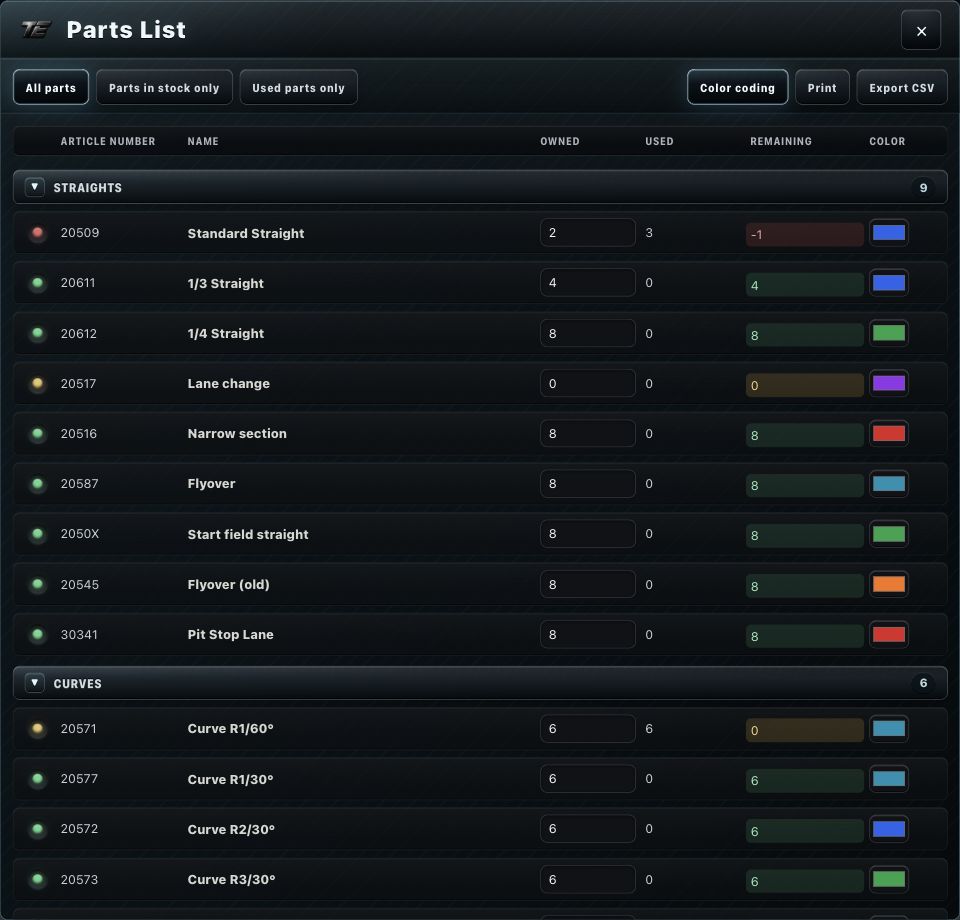
What the parts list shows
The parts list is organized into categories and covers every part type of your selected track system, each showing: owned/available, used, and remaining.

Export
The parts list can be exported as CSV or PDF.
Derived from the actual layout
The parts list is derived from your actual layout — it isn't a separately maintained dataset.
Documentation gap
Further parts list actions beyond the owned/used/remaining display and CSV/PDF export aren't fully documented yet.
Related articles
Was this page helpful?